Primmie Valorant Crosshair Code & Setup (2026 Guide)
Quick Navigation
Who Is TLN Primmie in Valorant?
Primmie (Papaphat Sriprapha) is a Thai duelist for Talon Esports in the VCT Pacific league, known for his high‑sens aim, explosive mechanics, and confidence in taking first duels. Clips of his one‑taps and fast flicks have made “Primmie Valorant crosshair” and “Primmie settings” popular searches for ranked players who want to copy his feel.
On BattlePooja, we already broke down his full configuration in our settings guide: you can find his DPI, sens, keybinds, and video options here: TLN Primmie Valorant Settings 2026. This page focuses specifically on his crosshair code and how to adapt it to your own setup.
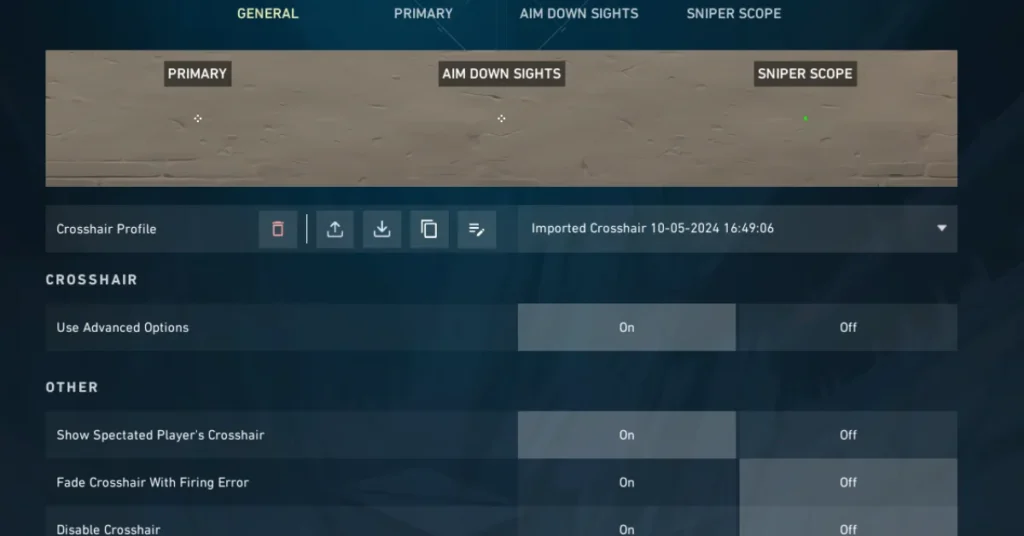
Primmie’s Valorant Crosshair Code (2026)
Different tracking sites record slightly different crosshair profiles for Primmie over time, but settings databases agree on a simple, static profile he used around Champions 2024 and into the 2026 season. That code looks like this:
Primmie crosshair code (last widely reported):
0;s;1;P;u;FF99FFFF;o;1;d;1;f;0;0b;0;1b;0;S;o;1
This profile creates a thin, minimal crosshair with a bright color, no center dot, and no movement or firing error, which matches the style you can see when you watch his POV in official matches and highlight reels.
How to Import Primmie’s Crosshair in Valorant
Importing the crosshair is quick and only takes a few clicks. Here is how to copy Primmie’s crosshair into your own Valorant client using the code above:
- Open Valorant and go to Settings (top right gear icon).
- Click the Crosshair tab at the top of the settings window.
- In the Crosshair Profile section, click the little icon with a downward arrow (Import).
- A small text box will pop up. Paste the code
0;s;1;P;u;FF99FFFF;o;1;d;1;f;0;0b;0;1b;0;S;o;1into that box. - Press Import to save it as a new profile, then select that profile as your active crosshair.
Once it is imported, hop into the Practice Range, bots, or Deathmatch to get used to the new look before you commit to using it in ranked.
What Primmie’s Crosshair Looks Like & Why It Works
Based on publicly shared settings screenshots, the crosshair linked to Primmie is a small, static shape with no center dot and no dynamic movement or firing error. It is designed to stay perfectly still when you move or shoot, which rewards good discipline and muscle memory over reactive, “wobbly” aiming habits.
The bright color and thin lines help the crosshair stay visible against most Valorant map backgrounds without blocking enemy heads, which fits his aggressive style where he often takes tight peeks and relies on precise headshots rather than spraying. For high‑sens players, this kind of minimal crosshair makes it easier to see exactly where your first bullet will land.
How to Customize Primmie’s Crosshair for Your Setup
Copying a pro’s crosshair can be a great starting point, but you should still adjust it to match your monitor, resolution, and personal preferences. Here are a few easy tweaks you can try without losing the “Primmie feel” entirely:
- Make lines slightly thicker on low resolutions: If you play stretched or on a small monitor, bump thickness or opacity a little so the crosshair does not disappear during hectic fights.
- Change colour for better visibility: If the bright cyan/pink tone is hard to see on some maps, try switching to white, yellow, or green while keeping the rest of the settings the same.
- Add tiny outlines if you lose it against walls: Turning on a very thin dark outline can help the crosshair pop against light backgrounds without making it chunky.
- Keep movement and firing error off: Unless you are a brand‑new player, it is usually better to leave those off so your crosshair stays static, just like Primmie’s. If you want training wheels, you can test movement error in the Range first.
If you also want to match his mouse feel, you can combine this crosshair with our full settings breakdown here: TLN Primmie Valorant Settings 2026. Just remember that crosshair and sensitivity are personal – use Primmie as inspiration, not a hard rule.
If you want your aim to actually feel like an upgrade and not just a new look, combine this crosshair with a proper sensitivity check. Instead of randomly copying pro sens, you can run your own values through our free PSA Method Calculator for Valorant and lock in a sensitivity that suits your hand while you use Primmie’s crosshair.
FAQ – Primmie Valorant Crosshair
Is this Primmie’s exact current crosshair?
No guide can guarantee a pro’s exact, current settings on every patch, and Primmie can change his crosshair at any time. This code is taken from trusted publicly available settings information and reflects a commonly used profile around Champions 2024 and into the 2026 season.
Where can I check if his crosshair has changed?
If you want to double‑check the latest version, you can look up his page on settings trackers or compare this profile with POV footage from his latest matches. These sites and clips are updated whenever new information is confirmed.
Can copying Primmie’s crosshair make me play like him?
Copying a pro player’s crosshair will not instantly give you their aim, but it can give you a clean, proven starting point to build your own consistency on. What really matters is practice, crosshair placement, and sticking to one setup long enough to build muscle memory.
What should I change first if this crosshair feels off?
If the base profile feels too small or hard to see, start by adjusting color and line thickness before you completely switch to another design. Make one change at a time, test it in a few games, and stop tweaking once it feels natural.

Hi, I’m Pooja—Gamer, Creator, and Performance Tool Builder. After grinding in Valorant, I realized competitive players needed clean, data-driven calculators without the heavy ads. I created BattlePooja to bridge the gap between technical hardware optimization and in-game mechanical skill.