TenZ & Demon1 Valorant Settings (March 2026): Pro Sensitivity, Crosshairs, and Video Setups Explained
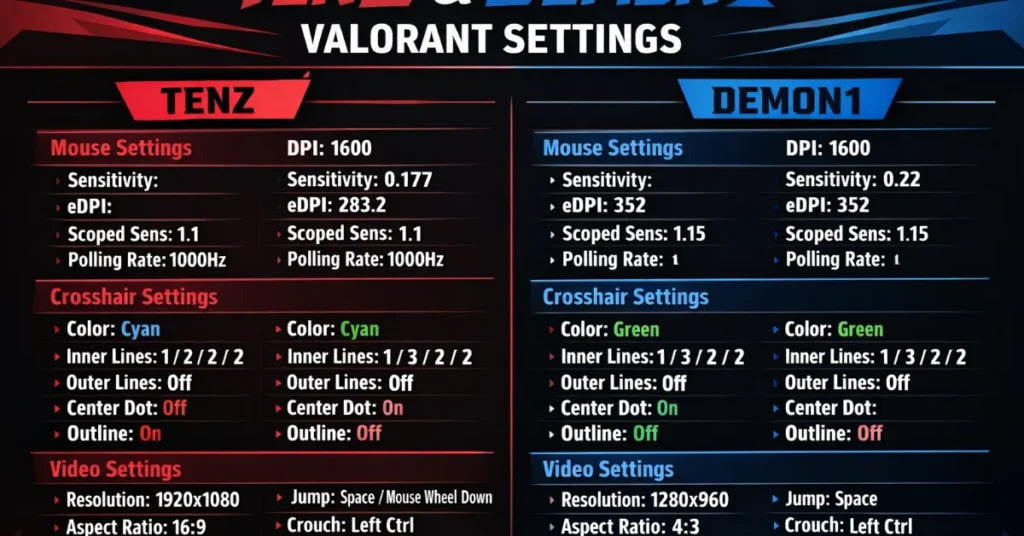
TenZ and Demon1 are two of the most talked‑about aimers in Valorant. Players copy their sens and crosshairs hoping to steal some of that “pro aim”, but the settings only work if you understand how and why they play the way they do. This guide breaks down both players’ March 2026 Valorant settings and shows you how to adapt them for your own rank and setup.
You’ll get full mouse, crosshair, video, and keybind settings for TenZ and Demon1, plus a clean comparison table and practical advice on which pro’s setup is closer to your natural playstyle.
TenZ plays on a slightly higher eDPI with a bright cyan crosshair and performance‑focused graphics, while Demon1 prefers a lower sens, classic white crosshair and standard 1080p resolution. If you are a fast, flicky duelist, start from TenZ. If you like slower, precise rifling, start from Demon1.
TenZ vs Demon1 – quick comparison (mouse, eDPI, res)
Here’s a quick overview of how their core settings compare. Use this table as a fast reference before you dive into the full sections.
| Setting | TenZ | Demon1 |
|---|---|---|
| Mouse DPI | 1600 | 1600 |
| In‑game sensitivity | 0.10 | 0.125 |
| Approx. eDPI | 160 | 200 |
| Scoped / Zoom sens | 1.0 | 1.0 |
| Main crosshair style | Small cyan, static | Simple white, static |
| Resolution | 1280×960 (4:3, stretched or black bars) | 1920×1080 (16:9, fullscreen) |
| Refresh rate | 360 Hz monitor | 240 Hz monitor |
Both pros use relatively low eDPI compared to casual players, but Demon1’s is slightly higher. TenZ’s setup feels a bit slower and more controlled, while Demon1’s gives a little extra speed for wide swings and snappy flicks.
TenZ Valorant settings (March 2026)
TenZ is known for ridiculous mechanical skill and smooth, controlled flicks. His current settings reflect that: low eDPI, clean cyan crosshair, and a performance‑focused graphics setup.
TenZ mouse settings
| Option | Value |
|---|---|
| Mouse | Pulsar TenZ Signature Edition (or similar lightweight mouse) |
| DPI | 1600 |
| In‑game sensitivity | 0.10 |
| Scoped / Zoom sensitivity | 1.0 |
| eDPI | 160 |
| Polling rate | 1000 Hz |
| Windows sensitivity | 6 / 11 |
| Raw input buffer | On |
This is a very low overall sensitivity. It’s amazing for tracking and micro‑adjustments, but it demands enough desk space and proper arm aim. If you are on a tiny mousepad or like wrist flicks, it will feel slow at first.
TenZ crosshair settings
TenZ switches crosshairs occasionally, but his modern setup is usually a small static cyan crosshair that’s easy to see on every map.
| Setting | Value |
|---|---|
| Crosshair color | Cyan |
| Outlines | On (low opacity, thin) |
| Center dot | Off |
| Show inner lines | On |
| Inner line length | 2 |
| Inner line thickness | 1–2 (slim) |
| Inner line offset | 2 |
| Movement / firing error | Off (static) |
| Sample crosshair code | 0;P;c;5;h;0;f;0;0l;2;0v;3;0o;2;0a;1;0f;0;1b;0 |
If this feels too small, start by increasing inner line length from 2 to 3 or thickness from 1 to 2, rather than swapping to a totally different crosshair shape.
TenZ video & graphics settings
| Category | Setting | Value |
|---|---|---|
| Display | Resolution | 1280×960 (4:3) |
| Display | Display mode | Fullscreen |
| Display | Refresh rate | Up to 360 Hz |
| Graphics quality | Material, Detail, UI | Low–Medium mix for maximum FPS |
| Graphics quality | Anti‑Aliasing | 2x MSAA (or similar) |
| Graphics quality | VSync | Off |
| Graphics quality | Bloom | Off or low |
| Graphics quality | Distortion | Off |
| Graphics quality | Cast shadows | Off |
| Accessibility | Enemy highlight color | Yellow (Deuteranopia) or similar high‑contrast option |
The general idea is simple: keep the game as clear and responsive as possible. High refresh rate, lower resolution, and mostly low graphics reduce visual noise and input lag.
TenZ keybind highlights
TenZ mostly sticks to classic binds with small quality‑of‑life tweaks.
- Walk: Left Shift
- Crouch: Left Ctrl
- Jump: Space / Mouse Wheel Down (optional)
- Ability 1 / 2 / 3: C, Q, E (or similar layout)
- Ultimate: X
Demon1 Valorant settings (March 2026)
Demon1 is famous for insane confidence and aggressive rifling. His settings lean slightly faster than TenZ, with a clean white crosshair, standard 1080p resolution and very readable visuals.
Demon1 mouse settings
| Option | Value |
|---|---|
| Mouse | Lightweight 1600 DPI gaming mouse |
| DPI | 1600 |
| In‑game sensitivity | 0.125 |
| eDPI | 200 |
| Scoped / Zoom sensitivity | 1.0 |
| Polling rate | 1000 Hz |
| Windows sensitivity | 6 / 11 |
| Raw input buffer | On |
This is still a low sens, but it’s slightly higher than TenZ. It’s a nice middle ground if you like arm aim but still want quick swings and smoother 180‑degree turns.
Demon1 crosshair settings
Demon1 usually runs a simple white crosshair: easy to see, no gimmicks.
| Setting | Value |
|---|---|
| Crosshair color | White |
| Outlines | On (low opacity) |
| Center dot | Off |
| Show inner lines | On |
| Inner line length | 3 |
| Inner line thickness | 1–2 |
| Inner line offset | 2 |
| Movement / firing error | Off (static) |
| Sample crosshair code | 0;P;c;1;h;0;f;0;0l;3;0v;2;0o;1;0a;1;0f;0;1b;0 |
White is risky on some bright spots, but it’s extremely clean and looks good for content. If it blends on certain maps, try switching to yellow or cyan with the same values.
Demon1 video & graphics settings
| Category | Setting | Value |
|---|---|---|
| Display | Resolution | 1920×1080 (16:9) |
| Display | Display mode | Fullscreen |
| Display | Refresh rate | Up to 240 Hz |
| Graphics quality | Material, Detail, UI | Mostly Low / Medium for clean visuals |
| Graphics quality | Anti‑Aliasing | 2x MSAA or similar |
| Graphics quality | VSync | Off |
| Graphics quality | Bloom | Off |
| Graphics quality | Distortion | Off |
| Graphics quality | Cast shadows | Off |
| Accessibility | Enemy highlight color | Red or Yellow, depending on preference |
Demon1’s setup is more “plug and play” for the average player: standard 1080p, familiar aspect ratio, and typical low graphics. If you’re not used to stretched 4:3, this will feel more natural.
Demon1 keybind highlights
His binds are also close to default with a few tweaks for comfort.
- Walk: Left Shift
- Crouch: Left Ctrl
- Jump: Space / Mouse Wheel
- Ability 1 / 2 / 3: C, Q, E (or similar)
- Ultimate: X
Which pro’s settings should you copy?
Instead of asking “which settings are better”, think “which settings are closer to my natural style.” Here’s a quick guide.
| If you are… | Start from… | Why |
|---|---|---|
| Low‑sens arm aimer, patient rifler | TenZ settings | Very low eDPI and small crosshair reward careful crosshair placement and tracking. |
| Aggressive rifler / entry duelist | Demon1 settings | Slightly higher eDPI and clear white crosshair suit fast swings and wide peeks. |
| New to low sens | Halfway between both | Try 1600 DPI with 0.11–0.12 sens and adjust up/down in tiny steps. |
| Comfortable on 1080p | Demon1 resolution | Stick with 1920×1080 instead of forcing stretched resolution early on. |
| Already used to 4:3 / stretched | TenZ resolution | 1280×960 can make models feel larger and easier to track for some players. |
Whatever you pick, make tiny changes and then lock them in. Your aim improves from consistency, not from chasing every tiny change pros make week to week.
FAQ – Pro Valorant settings and your aim
Will using TenZ or Demon1’s settings make me aim like them?
No. Settings can remove bad habits and give you a better foundation, but crosshair placement, game sense and consistent practice matter far more. Treat pro settings as a good starting point, not a shortcut.
Is 1600 DPI too high for Valorant?
1600 DPI with low in‑game sensitivity is totally fine. What matters is your final eDPI and how it feels on your desk. Many pros prefer 800 DPI, but 1600 DPI with lower sens can feel smoother on some mice and pads.
Should I switch to 4:3 stretched like TenZ?
Only if you genuinely prefer how it feels. Stretched 4:3 can make models appear larger, but it also changes your field of view and can look strange if you’re used to 16:9. Try it for a few days before committing.
How often do pro players change their settings?
Pros tweak things occasionally, but not as often as ranked players think. Most changes are tiny – one or two steps in sensitivity or small crosshair adjustments. The key is building muscle memory with a stable baseline.
Should I copy their keybinds as well?
Only if your current binds cause mis‑inputs or feel uncomfortable. Keybinds are heavily based on hand size and keyboard habits. It’s better to keep what feels natural and only change binds that are clearly holding you back.
“If you want more meta‑focused guidance instead of just copying pros, see our best Valorant agents after patch 12.02 breakdown.”
Disclaimer:

Hi, I’m Pooja—Gamer, Creator, and Performance Tool Builder. After grinding in Valorant, I realized competitive players needed clean, data-driven calculators without the heavy ads. I created BattlePooja to bridge the gap between technical hardware optimization and in-game mechanical skill.